Task Run Queue
The task run queue shows all tasks that are currently waiting to execute or are in the process of being picked up by the orchestrator. Use it to understand execution order, identify bottlenecks, and monitor concurrency constraints.
Accessing the queue
Navigate to Operate > Task Run Queue.
The queue displays a table of all pending task runs. Each row represents a single task waiting to execute.
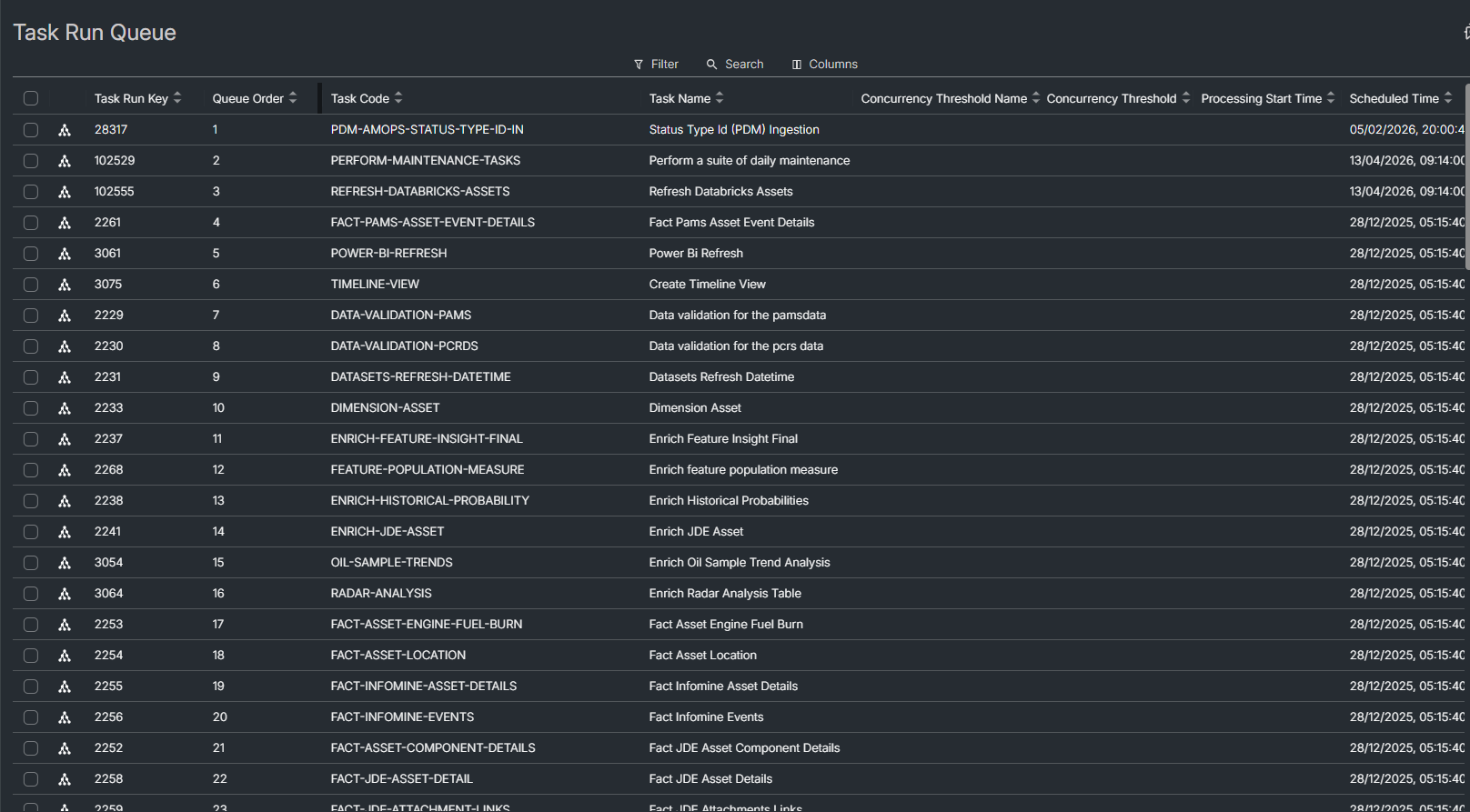
Queue columns
The table shows the following columns by default:
| Column | Description |
|---|---|
| Task Run Key | Unique identifier for the task run |
| Queue Order | Position in the execution queue |
| Task Code | The task's unique code |
| Task Name | Display name of the task |
| Concurrency Threshold Name | Name of the concurrency threshold that governs this task's execution |
| Concurrency Threshold | Maximum number of concurrent executions allowed by the threshold |
| Processing Start Time | When the orchestrator began processing the task |
| Scheduled Time | When the task was scheduled to run |
| Status | Current run status (e.g. Scheduled, Waiting) |
| Awaiting Dependencies | Whether the task is waiting for upstream tasks to complete |
Additional columns are available but hidden by default. Right-click a column header to show or hide columns:
| Column | Description |
|---|---|
| Run Order | Order within the production line run |
| Priority | Execution priority level |
| Concurrency Threshold Type | Type of concurrency constraint applied |
| Number of Times Dismissed due to Throttling | Number of times the task was deferred due to throttling |
Filtering the queue
Filter the queue to find specific tasks:
- Search — type a keyword to filter across task names and codes.
- Status — filter by run status code.
- Concurrency Threshold Name — filter by a specific concurrency threshold.
- Concurrency Threshold — filter by threshold value.
- Concurrency Threshold Type — filter by threshold type.
- Awaiting Dependencies — show only tasks that are or are not waiting on upstream dependencies.
Filters persist between sessions. Sharing the page URL preserves the active filters for other users.
Sorting
Click any column header to sort the queue. Click again to reverse the sort direction. Sort state is persisted alongside filters.
Viewing task details
Click a row to open a detail panel on the right side of the screen. The panel shows the full task configuration and properties. Click the same row again or close the panel to return to the queue view.
Elevating priority
You can promote one or more queued tasks ahead of the rest of the queue.
- Select the tasks you want to promote:
- Right-click a single task row, or
- Tick the checkboxes for multiple rows, then right-click any selected row.
- Choose Elevate Priority from the context menu.
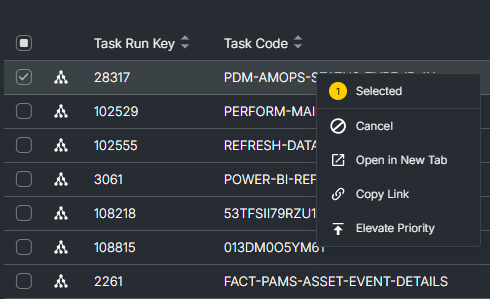
Elevating priority sets the task's Priority to 99, which is the maximum value. The orchestrator picks up higher-priority tasks first, subject to concurrency thresholds and upstream dependencies.
Use this option sparingly. Promoting many tasks to high priority defeats the purpose — only elevate tasks that genuinely need to jump the queue.
Understanding the queue
Queue order
Queue order determines the sequence in which the orchestrator picks up tasks for execution. Tasks with a lower queue order are picked up first, subject to concurrency and dependency constraints.
Concurrency thresholds
Concurrency thresholds limit how many tasks of a given type can run at the same time. When a threshold is reached, additional tasks remain in the queue until a running task completes. The Number of Times Dismissed due to Throttling column tracks how many times a task was deferred because its concurrency threshold was full.
Upstream dependencies
A task with Awaiting Dependencies checked is waiting for one or more upstream tasks to finish before it can start. The task remains in the queue until all its dependencies have completed. See Task Run Statuses for how dependency outcomes affect downstream tasks.