Multi-step Tasks
Some tasks run as a sequence of steps. Each step is an independent unit of work with its own status, timings, and retry count. Insight Factory tracks and retries steps individually, so a run shows exactly which step succeeded or failed.
What makes a task multi-step
You don't create or arrange steps yourself. Whether a task runs as multiple steps depends on its activity:
- Some activities become multi-step when a property is selected. For example, an ingestion activity with Copy to Lakehouse Table enabled runs as two steps: the first copies the source data into the data lake, and the second loads it into the Lakehouse table.
- Export activities always run as multiple steps, with no configuration needed.
The steps run in order — a step starts only after the previous step finishes.
Viewing steps in a run
Open the task, then select the Runs tab. Click a run to expand it. The run shows a summary at the top, followed by each step in the order it ran.
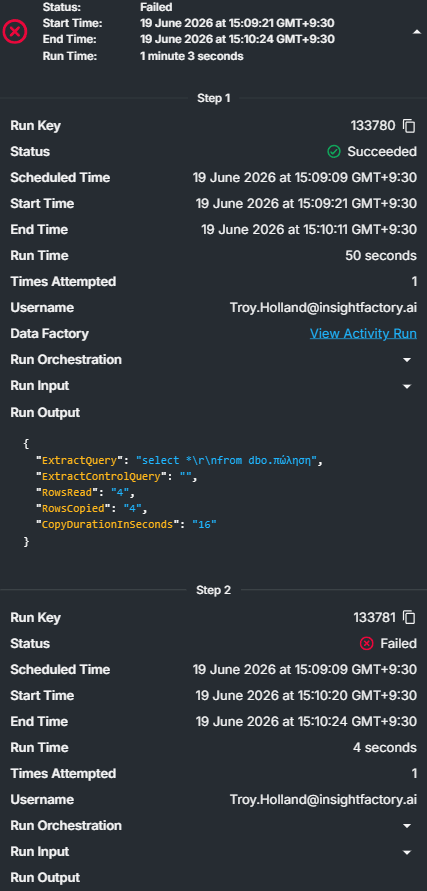
The summary at the top reports the overall Status, Start Time, End Time, and Run Time for the whole run. Each step below it has its own detail.
Step detail
Each step shows the following:
| Field | Description |
|---|---|
| Run Key | Unique identifier for the step's run |
| Status | The step's outcome (for example, Succeeded or Failed) |
| Scheduled Time | When the step was scheduled to run |
| Start Time | When the step started |
| End Time | When the step finished |
| Run Time | How long the step took |
| Times Attempted | The number of attempts for this step. Steps are retried individually, so this count is tracked per step |
| Username | The user the run was triggered as |
| Data Factory / Notebook Run | A link to the underlying execution — the Data Factory activity run or the Databricks notebook run — shown where applicable |
| Run Orchestration | The orchestration detail for the step. Expand to view |
| Run Input | The input passed to the step. Expand to view |
| Run Output | The result returned by the step |
How step status affects the run
Steps run in sequence. When a step fails, the run is marked Failed, and the step detail shows which step failed and its Run Output — useful for diagnosing where a run stopped. Because each step is tracked separately, a partially completed run shows the steps that succeeded alongside the one that failed.
See Task Run Statuses for how run outcomes are represented across Insight Factory.