Notifications
Configure email notifications to receive alerts when production lines succeed or fail.
Overview
Notifications send email alerts based on production line execution outcomes. Configure notifications at different levels depending on how broadly you want to receive alerts:
- Solution level: Receive alerts for all production lines in the solution
- Production line level: Receive alerts for a specific production line
- Task level: Receive alerts for individual task outcomes
Notification Types
| Type | When Sent | Use Case |
|---|---|---|
| On Success | Production line or task completes successfully | Confirm critical pipelines completed |
| On Failure | Production line or task fails | Alert teams to investigate issues |
| On Blocked | A task is blocked because an upstream task failed. Available at the task level only. | Get notified when a critical task cannot run due to an upstream failure |
Configuring Notifications
The notification setup process is the same at every level. The only difference is the scope of what triggers the notification, and which notification types are available.
| Level | On Success | On Failure | On Blocked |
|---|---|---|---|
| Solution | Yes | Yes | No |
| Production line | Yes | Yes | No |
| Task | Yes | Yes | Yes |
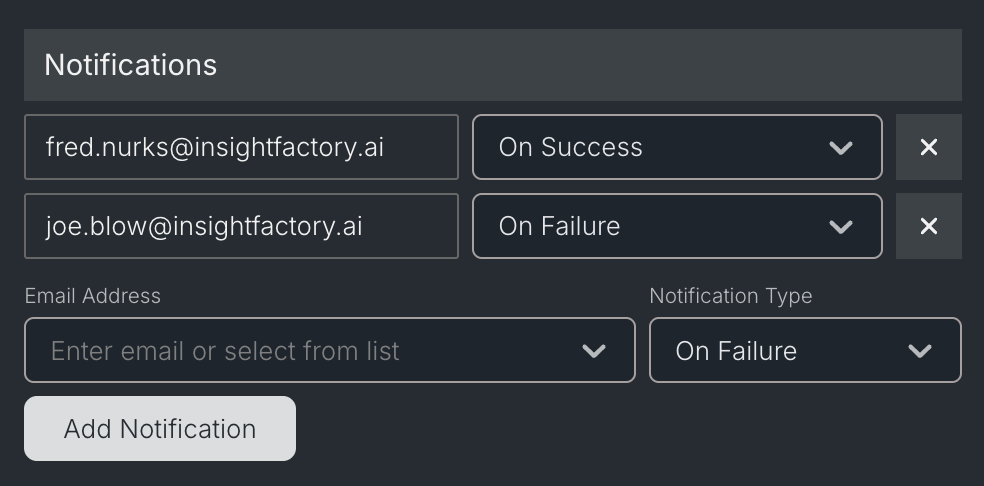
Add a new notification
- Open the solution, production line, or task panel
- Make sure you're viewing the Properties tab
- Scroll to the Notifications section
- Enter or select an email address
- Select a notification type. On Blocked appears only when configuring a task
- Click Add Notification
- Use solution-level notifications when you want alerts for all production lines within a solution
- Use production line-level notifications when you want alerts for a specific pipeline
- Use task-level notifications when you need alerts for specific operations within a production line
Managing Notifications
To remove a notification:
- Open the properties panel for the solution, production line, or task
- Find the notification in the Notifications section
- Click the delete icon next to the notification
Best Practices
Start broad, then refine: Configure solution-level failure notifications first. Add task-level notifications only for critical operations that need immediate attention.
Use failure notifications for monitoring: On Failure notifications are more actionable than On Success. Focus on alerting when something goes wrong rather than confirming every successful run.
Avoid notification fatigue: Too many notifications reduce their effectiveness. Reserve notifications for pipelines that require human attention when they fail.
Consider your team structure: Use distribution lists or team email addresses rather than individual emails. This ensures notifications reach the right people even when team members are unavailable.