Databricks Compute
View the Databricks compute resources available to your Insight Factory and set a concurrency threshold for each one. The threshold controls how many tasks can run on a given compute resource at the same time.
Databricks Compute is currently in preview.
Accessing the page
Navigate to Administer > Databricks Compute.
The page lists the compute resources that have been synced from Databricks. Each row is a single compute resource.

Compute columns
| Column | Description |
|---|---|
| Compute Name | The name of the compute resource in Databricks |
| Compute ID | The compute resource's unique Databricks identifier |
| Runtime Version | The Databricks runtime version. Shows - when no version is reported |
| Concurrency Threshold | The maximum number of tasks that can run on this compute at once |
Use Filter, Search, and Columns in the toolbar to narrow the list and show or hide columns.
Refreshing the compute list
Click Refresh Compute to sync the list with Databricks. Insight Factory adds compute resources that are new, updates those that have changed, and deactivates any that no longer exist in Databricks. A confirmation reports the result, for example:
Compute refreshed: 0 added, 0 updated, 0 deactivated
Run a refresh after creating or removing compute in Databricks so the list reflects what's currently available.
Setting a concurrency threshold
The concurrency threshold limits how many tasks run on a compute resource at the same time. When the threshold is reached, additional tasks wait in the Task Run Queue until a running task completes. Use it to stop a single compute resource from being overloaded by too many concurrent runs.
- Click a compute resource in the list. The Properties panel opens on the right.
- Enter a value in Concurrency Threshold. This is the number of concurrent tasks that can run on this compute.
- Click Save (or press Ctrl+S).
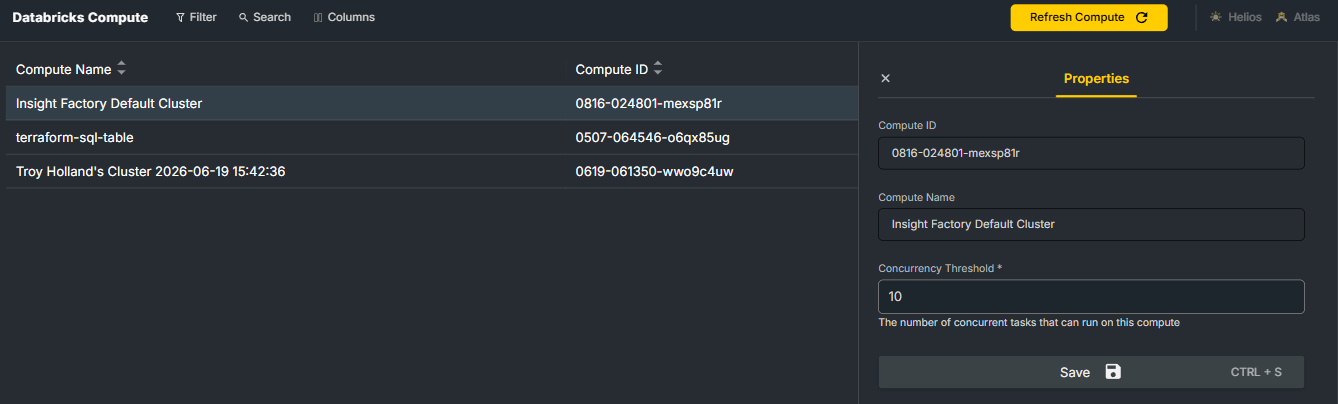
Compute ID and Compute Name are read-only — they come from Databricks and can't be edited here. Only the concurrency threshold is configurable.