v6.4 Release Notes
Here's what's new in version 6.4.
New Features
Ingest Direct to Lakehouse Table
Possibly our most requested feature, most ingestion activities now include a Lakehouse Table section within the task configuration. Unless you specifically need to separate the ingestion and Lakehouse creation tasks, you can now directly create the Lakehouse table from ingestion tasks. This change means the Convert a Parquet file into a Lakehouse Table activity is only required for advanced scenarios.
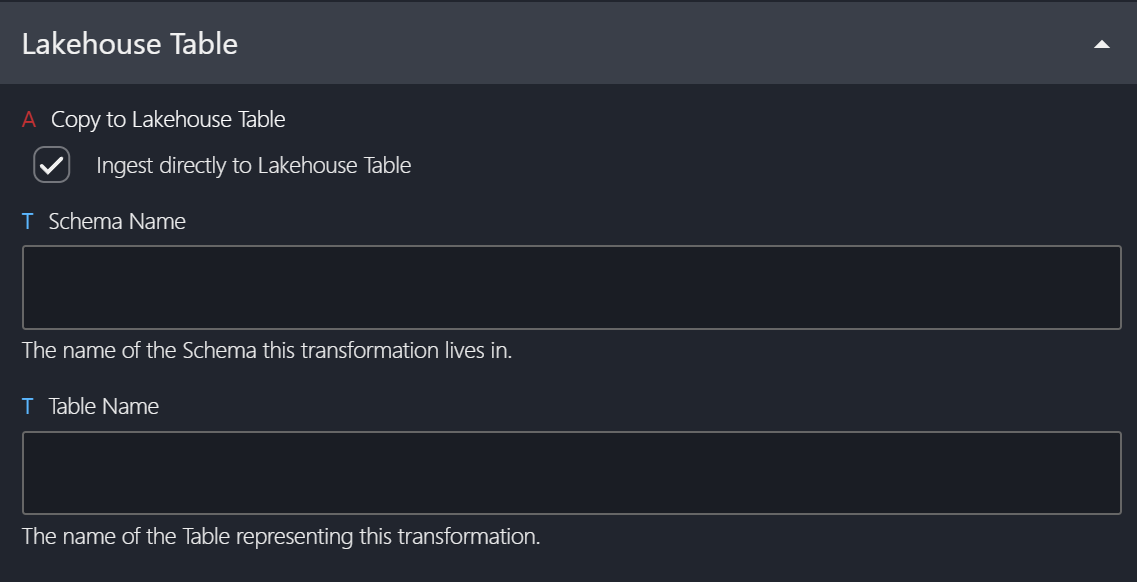
During migration to 6.4, the new Copy to Lakehouse Table setting will be disabled for existing tasks. It will be enabled by default when creating new ingestion tasks.
Task Cancellation Improvement
Previously, cancelling a task within the UI would simply set the task status to "Cancelled" without actually stopping the running process. This led to two significant issues:
- Long-running tasks continued running in the background, increasing costs and potentially impacting source system performance.
- These tasks could eventually complete and update their status, causing confusion.
We've now overhauled this behaviour. Cancelling a task now sends a cancellation request directly to the associated service (e.g., Databricks, Data Factory, Power BI), stopping the process as expected.
Stacked Panels
Another highly requested feature was the ability to create related entities, like task groups, directly from the task panel. We've introduced stacked panels to address this. You can now start creating a task, and if you realise you need a task group, simply click the plus button next to the Task Group select list. Once you save the new group, you'll return to the task panel exactly where you left off, with the new task group automatically selected.
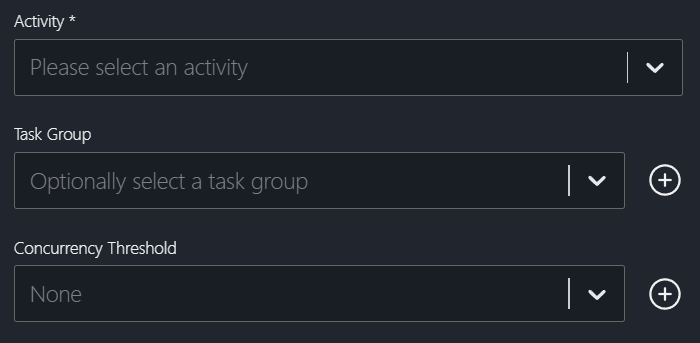
Standard/Advanced Mode for Task Metadata
For most tasks, only mandatory and default settings are needed. To simplify task configuration, we've introduced Standard and Advanced modes. Standard mode hides most non-mandatory settings and advanced features such as concurrency thresholds, priority, and state configuration.
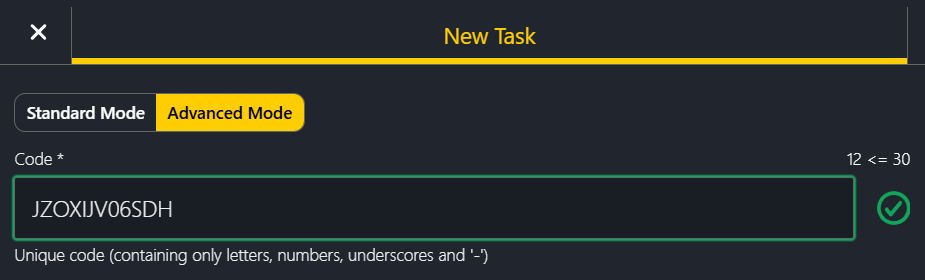
Enhancements
- Removed toast notifications for some graph actions (e.g., linking/unlinking tasks).
- Ingestion activities no longer delete source files by default (the ‘Delete File From Source After Copying?’ setting). Existing tasks have been updated to reflect this new default.
- Improved support for multi-line CSV and JSON files.
- Removed the 'Large graph' warning modal.
Bug Fixes
- Fixed an issue with bulk updates not clearing task groups.
- Fixed an issue with bulk updates not correctly updating the 'Is Active' setting.
- Fixed an issue with bulk updates not functioning from the task dependency graph.
- Fixed an issue where panels did not close correctly when opening a context menu.
- Fixed an issue with the Integration Runtime select list not displaying dynamic configurations.
New Activities
- Run Logic App Workflow
- Executes a workflow in Azure Logic Apps via a trigger.
- Ingest Snowflake (via Basic Auth) as Parquet
- Copies data from Snowflake using Basic Authentication into Parquet format stored in Azure Data Lake Storage Gen2.
- Ingest MySQL as Parquet
- Copies data from MySQL into Parquet format stored in Azure Data Lake Storage Gen2.
- Ingest PostgreSQL as Parquet
- Copies data from PostgreSQL into Parquet format stored in Azure Data Lake Storage Gen2.
- Ingest OData (via Windows Auth) as Parquet
- Copy data from OData resource, using Windows Authentication, to parquet format in Azure Data Lake Storage Gen2.
Decommissioned Features
The previous 'Ingest MySQL as Parquet' activity has been deprecated. Existing instances have been renamed to 'Ingest MySQL as Parquet (Legacy)'. This legacy activity uses an outdated MySQL connector, and we recommend upgrading to the new activity as soon as possible.