v6.1 Release Notes
Here's what's new in version 6.1.
New Features
Updated and Simplified Context Menu
The graph and table context menus are now multi-level with a more obvious 'verb > function' syntax.
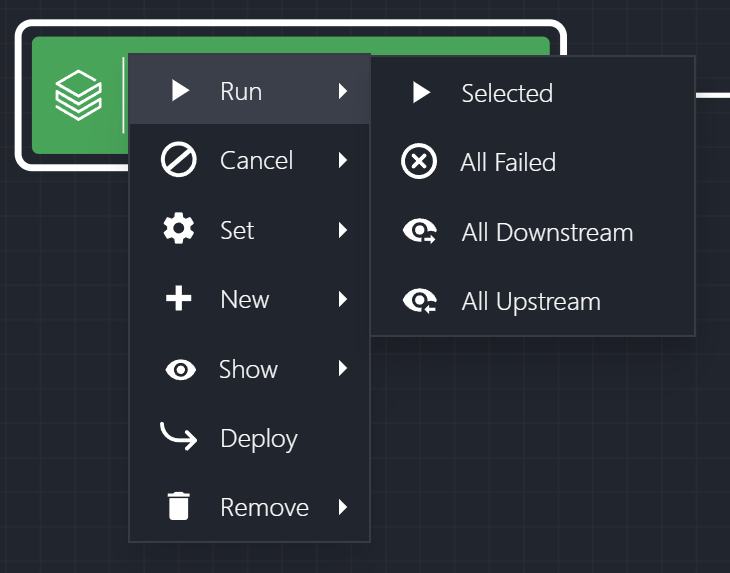
Bulk Update
Common properties of a selection of tasks can now be updated in a single operation. Simply select multiple tasks in a graph or table, choose Update from the context menu or action bar, and modify one or more common properties. For example, add a task group to a selection of tasks in a single editing operation.
New Graph Functions
Several new functions have been added to the graph menus (both page and context):
- Re-run all FAILED Tasks
- From the Production Line menu, re-run all tasks in that production line that are in a FAILED state.
- From a selection of tasks in the Production Line graph, re-run all tasks in that selection that are in a FAILED state.
- Cancel all PENDING Tasks
- From the Production Line menu, cancel all tasks in that Production Line that are in a PENDING state (i.e., SCHEDULED, RUNNING).
- From a selection of tasks in the Production Line graph, cancel all tasks in that selection that are in a PENDING state (i.e., SCHEDULED, RUNNING).
- Select all FILTERED Tasks
- Use the Filter and Search buttons to narrow down your focus to only relevant tasks in a graph.
- Click the ‘Select all Filtered’ button (see below) in the top menu to select all tasks that remain highlighted - you can then perform an action on this selection as a group.
- In the graph, add multiple new tasks to a Production Line via a Blueprint
- This is useful for composite actions such as ingesting a dataset into the Lakehouse and immediately creating a Delta Table from it. Typically, this would require two task creations plus a dependency added between them.
- Adding this from a Blueprint that asks only the relevant information required to create both tasks will create both tasks automatically and connect them together via a dependency assignment.
Additional Information for Production Lines
From the Production Line Metadata tab, you can now see all schedules that this Production Line is involved in. You can also add this Production Line to a schedule or remove it from a schedule right from this panel without having to switch to the Schedules screen.
Additional Information for Tasks
From the Task Metadata tab, you can now see all schedules that this task is involved in. You can also add this task to a schedule or remove it from a schedule right from this panel without having to switch to the Schedules screen.
From the Task Status tab, you can now see all Production Lines that this task is a member of. This is useful if you notice unusual run activity on a task - you can now see if this task is a member of additional Production Lines that you are not currently aware of and may be scheduled differently.
Multilingual UI
This is still in private preview, but the foundations are being laid for the Insight Factory UI to support a range of languages in addition to English. More to come on this soon.
New Activities
Several new activities have been added that will allow for a variety of new capabilities:
- Convert Text File to Delta Table
- Convert a text file to a Delta Table with each row representing a single line in the file.
- Convert Excel Worksheet to Delta Table
- Convert a data table from a single worksheet in an Excel file to a Delta Table.
- Export from Delta Lake to SQL Server
- Run a query or notebook code against the Delta Lake and export the results to a table in a SQL Server.
- Set Task State
- There are times when you would prefer to do an incremental load of data but due to the nature of the data source, you cannot determine the high-water mark during this load to use for the next load.
- This can now be determined later in the Delta Lake and replayed back to another task’s state.
- One or multiple properties in a task’s state can be set at the same time.
- Federated Task
- When you wish to take a dependency on a task running in another Insight Factory (only applicable for a Federated Factory ecosystem).
- Add a Federated Task to your Production Line, which acts as a pointer to the actual task living in another Insight Factory.
- When the actual task changes its status, this will be reflected in the Federated Task.
- Webhook Task
- When you wish to take a dependency on an external process (outside of an Insight Factory).
- Add a Webhook Task to your Production Line, which provides a webhook for an external process to interact with.
- The status of a Webhook Task can be set by an external process by calling a specific secure web endpoint.
Decommissioned Features
None