v6.3 Release Notes
Here's what's new in version 6.3.
New Features
Updated Roles
With this release we've made it far easier to view, add and maintain a user's roles across all environments within an Insight Factory.
We have also split the roles into two groups, Factory Roles and Environment Roles. As the names imply, Factory Roles are assigned to users at the Insight Factory level, meaning they apply across all environments of the Insight Factory and Environment Roles apply to that specific environment only (for instance, most users are granted the Developer role with the Development Insight Factory, but very few, if any, should be granted this role in Production).
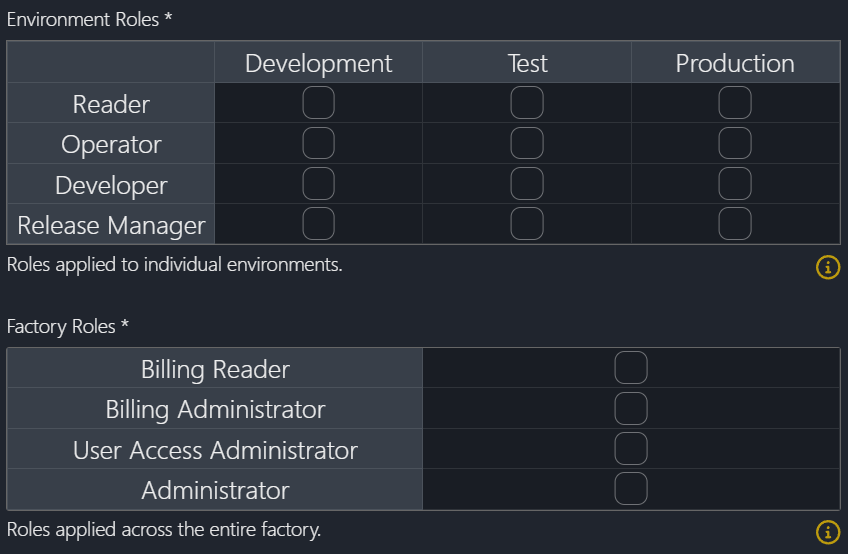
Users with the Reader role could previously run production lines or tasks. Users now need to be assigned the new Operator role (see below) to run production lines or tasks. Note that the Operator role does also give users the ability to update schedules and configuration.
The Administrator role previously allowed users to do anything within an Insight Factory. Moving forward, this role will be used for administration of an Insight Factory, which includes setting the time zone, Unity Catalog defaults, Reporting and Source Control values etc. Users will need to be assigned the Developer role to create and edit items or the Release Manager role to be able to approve deployments.
New Roles
As well as the role changes above, we have introduced two new roles, Operator and Billing Administrator. The Operator role is primarily intended to be used by support staff in the Production environment. This role allows users to view a task failure, investigate the issue and re-run the task if possible. It does not allow users to edit task metadata. This still needs to happen with the Development environment and be deployed following the Insight Factory SDLC.
The second new role is the Billing Administrator. Users with this role will be able to adjust user licencing and approve production line support requests.
Navigation Menu Tweaks
Given the importance of the navigation menu, along with new pages coming online, we have introduced the ability to collapse sections. You will also start to see little notification icons appear next to items, such as Deployments. These signify an alert or a pending action, such as a deployment that requires approval or that is waiting to be applied.

The Users tab has been split from Admin Settings into its own Users page, as well as a rename of the Costs page (see below).
Improved Billing
The current Costs page has been renamed to Production Support and moved under a new Billing section within the navigation menu. Along with Production Support, the Billing section features a new page for Licencing. These pages are only visible to users with the Billing Reader, Billing Administrator or User Access Administrator roles.
Enhancements
- Add ability to search and filter users by role within Users page
- Tasks > Runs tab now allows filtering
- Update Deployments to work with new Databricks Git Folders
- Database performance tweaks to speed up Pulse Health and Pulse Optimiser
- Forms that require lowercase or uppercase will now automatically force this case
- Lists within the Metadata tab, such as task dependencies or schedules, are now clickable links
Bug Fixes
- Fix issue with Ctrl-Z not working in several places
- Fix incorrect background colour on textbox input fields
- Fix issue caused by ampersands within a notebook name
- Fix deleted schedule causing historical run to not appear within Pulse Health
New Activities
- Ingest Amazon S3 Binary File
- Copy file(s) from Amazon S3 (accessed via an Access Key) to Azure Data Lake Storage Gen2.
- Create a View
- Creates a view within Databricks.
- Analyse Data Drift
- Checks whether the distribution of the input data has changed compared to the original training data. Behind the scenes, this runs the Data Drift notebook, which creates or updates a Delta table containing data drift analysis.
- Analyse Model Drift
- Checks if the performance of the model has degraded over time, often due to changing data patterns. Behind the scenes, this runs the Model Drift notebook, which creates or updates a Delta table containing model drift analysis.